Tool Calling
If the model supports tool calling, this tab is available.
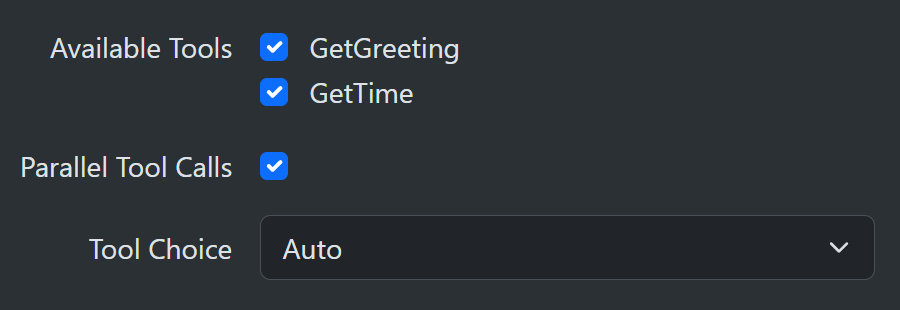
Available tools
During program setup, you can use the AddToolMethods extension to specify a list of C# static methods available for calling. Use a comma-separated list if you need to specify more than one method. You do not have to provide all the tools for every call. Use the checkbox in the tool table to select only those you want to make available during this model call.
  builder.Services.AddSharpOMaticEngine()
     .AddToolMethods(ToolCalling.GetGreeting, ToolCalling.GetTime);
Example tool call implementations.
    namespace SharpOMatic.DemoServer;

    public static class ToolCalling
    {
      [Description("Get a friendly greeting.")]
      public static string GetGreeting(IServiceProvider services)
      {
        var context = services.GetRequiredService<ContextObject>();
        context.Set("GetGreetingCalled", true);
        return "Howdy doody!";
      }

      [Description("Get current time")]
      public static string GetTime(IServiceProvider services)
      {
        var context = services.GetRequiredService<ContextObject>();
        context.Set("GetTimeCalled", true);
        return DateTimeOffset.Now.ToString();
      }
    }
Tool methods can use System.ComponentModel.DisplayNameAttribute to expose a different name to the model than the C# method name. This is useful when keeping C# methods in PascalCase while presenting snake_case tool names to an LLM.
    [DisplayName("get_greeting")]
    [Description("Get a friendly greeting.")]
    public static string GetGreeting(IServiceProvider services)
    {
      return "Howdy doody!";
    }
Per-tool AG-UI output
Each selected tool has an AG-UI Output dropdown in the tool table. This controls only the tool-call stream events for that specific tool. It does not change whether the tool can execute, whether the model sees the result, or whether trace information is recorded.
The available modes are:
- Inherit: use the global Disable Tool Events setting from the model call AG-UI tab.
- Always: emit tool-call stream events for this tool even when Disable Tool Events is enabled.
- Never: suppress tool-call stream events for this tool even when Disable Tool Events is disabled.
When a tool is deselected, its per-tool AG-UI output setting is removed. Existing workflows that do not have per-tool settings behave as though every selected tool is set to Inherit.
IServiceProvider
Notice that your methods can take IServiceProvider as a parameter. This allows you to get required data from the service provider. This example demonstrates how the workflow context for the model node can be accessed and modified. You could also request other interfaces relating to your own backend services.
Exiting a model call from a tool
Tool methods can exit the current model-call cycle without failing the workflow by throwing ModelCallExitException.
Use this when the tool discovers that the workflow must collect more input or perform another workflow step before the model can continue.
public static string AskForMissingInput(IServiceProvider services)
{
  var exit = new ContextObject();
  exit.Set("reason", "additional_input_required");

  throw new ModelCallExitException(exit, "agent.pendingInput");
}
SharpOMatic treats this exception as an intentional stop, not as a model-call error.
The model call still succeeds, writes the messages produced up to the tool call, closes any open stream events, and lets downstream workflow nodes decide how to continue.
When a ContextObject is provided, the model call writes it to the supplied context path.
The path defaults to exit, supports full context paths, and overwrites any existing value at that path.
The internal stop marker is not written as a tool result, so a later model call can continue from the saved chat history without seeing a fake tool response.
Parallel tool calls
Some model providers can make multiple tool call requests in a single model reply. This is called parallel tool calling and is more efficient than round-tripping for each individual tool call. Models offering this capability allow you to use this checkbox to turn it on or off.
Runtime stream events
When a model call performs tool calling, SharpOMatic now emits tool-call stream events as part of the live run output. These appear in the AG-UI tab and are also translated to AG-UI protocol events when using the AG-UI endpoint. If the node has Disable Tool Events enabled on its AG-UI tab, these protocol-style tool stream events are suppressed for that model call, but the tool-call trace information is still recorded. Per-tool AG-UI Output settings can override that global default for individual selected tools.
The tool-call stream lifecycle is:
ToolCallStartToolCallArgsToolCallEndToolCallResult
The trace viewer still records tool calls as information entries as well, so you keep both the protocol-friendly stream events and the trace summary.
Tool choice
There are only two options for this dropdown.
-
None: the list of tools is provided, but the model is not allowed to invoke any. This is useful if you want the model to create a plan of what to do but not actually execute that plan. In that case, it needs to know the availability and signature of the tools to plan.
-
Auto: the model can decide to invoke zero or more tools.