Code Node
The code node runs a C# script against the current workflow context. Use it for glue logic, calling backend services, or complex data transformations.
Access the Context
The script runs with a single global named Context, which is a ContextObject. Read and write values using Get, Set, or the standard dictionary and list APIs. Return values from the script are ignored, so update Context to persist results.
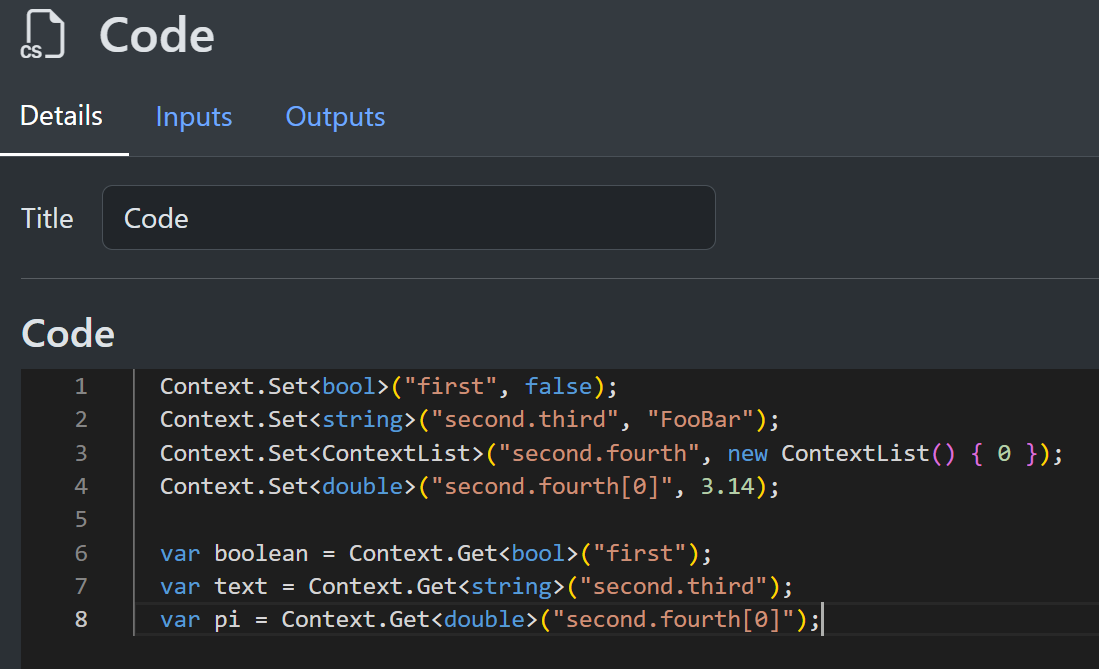
There are also TrySet and TryGet variations for scenarios where you do not know if they will succeed.

Asynchronous Code
You can perform await operations on asynchronous code in the usual way. It is recommended to use async operations when possible to free up the thread for slow operations. For example, file and network calls are typically quite slow and benefit from this approach.

Runtime Helpers
Code nodes also receive helper objects and imported helper types at runtime. These are available without adding them to the workflow context.
Assets
Use the Assets helper to load existing assets and create new run or conversation assets.
var promptAsset = Context.Get<AssetRef>("input.promptAsset");
var promptText = await Assets.LoadAssetTextAsync(promptAsset);

Context.Set("input.prompt", promptText);
You can also write generated bytes back to the asset store and place the returned AssetRef in context:
var bytes = System.Text.Encoding.UTF8.GetBytes("Generated by a workflow");

var outputAsset = await Assets.AddAssetFromBytesAsync(
    bytes,
    "generated.txt",
    "text/plain");

Context.Set("output.asset", outputAsset);
Templates
Use the Templates helper to expand the same {{$path}}, {{path}}, and <<asset-name>> markers used by Model Call text fields.
String context values and text asset contents are expanded recursively.
var prompt = await Templates.ExpandAsync("Summarize {{$input.topic}} using <<prompt-base.txt>>");
Context.Set("output.prompt", prompt);
Template expansion is read-only. Missing context paths or missing assets insert nothing. Cycles and runaway recursive expansion fail the node execution.
ImageHelper
ImageHelper is a static helper type for common image operations such as annotating points, rectangles, and polygons, or extracting image regions.
It lives in SharpOMatic.Engine.Helpers, which is imported by default.
var imageAsset = Context.Get<AssetRef>("input.image");
var imageBytes = await Assets.LoadAssetBytesAsync(imageAsset);

var rectangles = new List<RectangleF>
{
    new RectangleF(0.10f, 0.12f, 0.24f, 0.18f),
    new RectangleF(0.42f, 0.40f, 0.18f, 0.22f),
};

var annotatedBytes = ImageHelper.AnnotateRectangles(
    imageBytes,
    rectangles,
    ["Signature", "Stamp"]);

var annotatedAsset = await Assets.AddAssetFromBytesAsync(
    annotatedBytes,
    "annotated.png",
    "image/png");

Context.Set("output.annotatedImage", annotatedAsset);
ImageHelper uses System.Drawing and is currently supported on Windows only.
If your code creates PointF or RectangleF values, add the System.Drawing namespace and assembly to script options in your host setup:
builder.Services.AddSharpOMaticEngine()
  .AddScriptOptions(
    [typeof(RectangleF).Assembly],
    ["System.Drawing"]);
Debug
Use the Debug helper to add node-level debug information to the run trace. The optional second argument stores structured or raw detail text with the information entry.
var count = Context.Get<int>("input.count");

Debug.Add(
    "Preparing batch",
    JsonSerializer.Serialize(new { count }));
ServiceProvider
Use ServiceProvider when a code node needs a service registered by the host application. This is useful for application-specific services that should not be copied into workflow code.
var customerService = ServiceProvider.GetRequiredService<ICustomerService>();
var customer = await customerService.GetCustomerAsync(Context.Get<string>("input.customerId"));

Context.Set("output.customerName", customer.Name);
The service type and namespace must be available to the script.
Use AddScriptOptions when you need to expose host application assemblies or namespaces.
Stream Events
Code nodes also expose an Events helper for publishing workflow stream events. These events are persisted to run or conversation stream history and can be consumed by live clients such as the editor or AG-UI.
await Events.AddTextMessageAsync(StreamMessageRole.Assistant, "message-1", "Hello from the workflow");
For simple text or reasoning messages that come from a template, use the Event Template node instead of writing code.
Text stream helpers support StreamMessageRole.User, Assistant, Developer, System, and Tool.
Visible reasoning uses the dedicated reasoning helpers rather than AddTextMessageAsync.
All Events.Add* helpers now accept an optional silent flag.
Set silent: true when the event should still be recorded in SharpOMatic stream history but should be suppressed from AG-UI live SSE output.
This flag is transient and is not stored in the database.
await Events.AddTextMessageAsync(
    StreamMessageRole.User,
    "user-1",
    "What is the order status?",
    silent: true
);
The same helper surface also supports reasoning and tool-call lifecycles. For example, this emits a complete visible reasoning message:
await Events.AddReasoningMessageAsync("reason-1", "Thinking about the next step");
If you need the full reasoning lifecycle yourself, use the lower-level helpers:
await Events.AddReasoningStartAsync("reason-1");
await Events.AddReasoningMessageStartAsync("reason-1");
await Events.AddReasoningMessageContentAsync("reason-1", "Thinking about the next step");
await Events.AddReasoningMessageEndAsync("reason-1");
await Events.AddReasoningEndAsync("reason-1");
Tool calls are also supported. For example, this emits a tool call for the frontend to handle and return later:
await Events.AddToolCallAsync(
    "call-1",
    "lookup_weather",
    "{\"city\":\"Sydney\"}",
    "assistant-1"
);
If your workflow already has the tool result, emit the full lifecycle in one call:
await Events.AddToolCallWithResultAsync(
    "call-1",
    "lookup_weather",
    "{\"city\":\"Sydney\"}",
    "tool-result-1",
    "Sunny",
    "assistant-1",
    silent: true
);
Activity messages are also supported for AG-UI-compatible frontends. Use a snapshot to publish the current activity payload:
await Events.AddActivitySnapshotAsync(
    "plan-1",
    "PLAN",
    new { steps = new[] { new { title = "Search", status = "in_progress" } } },
    replace: false
);
Use a delta to apply RFC 6902 JSON Patch updates to an existing activity:
await Events.AddActivityDeltaAsync(
    "plan-1",
    "PLAN",
    new object[] { new { op = "replace", path = "/steps/0/status", value = "done" } }
);
For activity state that already lives in workflow context, the higher-level sync helper is usually simpler because SharpOMatic stores the previous snapshot in hidden workflow state, computes the JSON Patch for you, and automatically falls back to a replacement snapshot when the patch would be larger:
await Events.AddActivitySyncFromContextAsync(
    "plan-1",
    "PLAN",
    "activity.plan",
    replace: false
);

await Events.AddActivitySyncFromContextAsync(
    "plan-1",
    "PLAN",
    "activity.plan"
);
On the first call, this emits an activity snapshot. Later calls emit either an activity delta or, if the delta would be larger, a replacement snapshot.
Pass snapshotsOnly: true to force a snapshot on every sync call:
await Events.AddActivitySyncFromContextAsync(
    "plan-1",
    "PLAN",
    "activity.plan",
    snapshotsOnly: true
);
Use the lower-level activity helpers only when you want full control over the emitted payload or patch shape.
State messages are also supported for AG-UI-compatible frontends.
Use a snapshot to publish the full current agent.state payload:
await Events.AddStateSnapshotAsync(
    new { mode = "assistant", count = 1 }
);
Use a delta to apply RFC 6902 JSON Patch updates to the current state:
await Events.AddStateDeltaAsync(
    new object[] { new { op = "replace", path = "/mode", value = "review" } }
);
If your workflow already keeps state in agent.state, prefer the higher-level sync helper:
Context.Set("agent.state.mode", "assistant");
await Events.AddStateSyncAsync();

Context.Set("agent.state.mode", "review");
await Events.AddStateSyncAsync();
This compares the current agent.state value to hidden baseline state at agent._hidden.state and emits either StateDelta or StateSnapshot.
Pass snapshotsOnly: true to force a snapshot on every sync call:
await Events.AddStateSyncAsync(snapshotsOnly: true);
If the frontend only needs a simple progress phase marker, emit AG-UI-compatible step lifecycle events:
await Events.AddStepStartAsync("Search");
await Events.AddStepEndAsync("Search");
For application-specific AG-UI protocol extensions, emit a custom event:
await Events.AddCustomEventAsync(
    "weather_progress",
    "{\"stage\":\"fetch\"}"
);
This stores the custom event name in the stream event TextDelta field and the custom value string in Metadata.
Implicit Assemblies
The following using statements are implicitly already applied:
  using System;
  using System.Collections;
  using System.Collections.Generic;
  using System.Linq;
  using System.Text.Json;
  using System.Net.Http;
  using System.IO;
  using System.Threading.Tasks;
  using Microsoft.Extensions.AI;
  using Microsoft.Extensions.DependencyInjection;
  using SharpOMatic.Engine.Contexts;
  using SharpOMatic.Engine.Enumerations;
  using SharpOMatic.Engine.FastSerializer;
  using SharpOMatic.Engine.Helpers;
  using SharpOMatic.Engine.Interfaces;
You can access the types defined in these namespaces.
Additional Assembly References
If you need to access assemblies or types not already implicitly added, you can do so easily. When adding the SharpOMatic engine in program setup, add the AddScriptOptions extension. The first parameter is a list of additional assemblies that should be made available. Note that the referenced assembly must be part of the owning project, so you might need to add it to your project references.
In the following example, we add the demo server assembly by specifying one of the types within it so the entire assembly can be found. The second parameter is the list of extra namespaces to add. Here we have the namespace of the demo server.
  builder.Services.AddSharpOMaticEngine()
    .AddScriptOptions([typeof(ClassExample).Assembly], ["SharpOMatic.DemoServer"]);
Code compilation
Your code will automatically be checked to ensure it is valid. The familiar red error line will appear in the place the code has a problem. Do not ignore these because it indicates the code will fail at runtime. As noted above, you can add access to additional assemblies and types if you want to access backend-specific code.
Custom types and JsonConverter
The context must be serializable to and from JSON so that it can be saved to the database. This restriction allows a workflow to be suspended and restarted and allows intermediate states to be recorded to help with debugging.
Scalar values persist automatically with standard JSON serialization. Classes require a converter. You can register additional types from your project so they can be added to the context and persisted. Here is a trivial class definition.
  public class ClassExample
  {
      public required bool Success { get; set; }
      public required string ErrorMessage { get; set; }
      public required int[] Scores { get; set; }
  }
Now you need to implement a JsonConverter for it.
  public sealed class ClassExampleConverter : JsonConverter<ClassExample>
  {
      public override ClassExample? Read(ref Utf8JsonReader reader,
                                         Type typeToConvert,
                                         JsonSerializerOptions options)
          => JsonSerializer.Deserialize<ClassExample>(ref reader, Clean(options));

      public override void Write(Utf8JsonWriter writer,
                                 ClassExample value,
                                 JsonSerializerOptions options)
          => JsonSerializer.Serialize(writer, value, Clean(options));

      private JsonSerializerOptions Clean(JsonSerializerOptions options)
      {
          var inner = new JsonSerializerOptions(options);
          inner.Converters.Remove(this);
          return inner;
      }
  }
Provide the implementation type in the SharpOMatic setup and ensure the assembly and namespace are available to code execution.
  builder.Services.AddSharpOMaticEngine()
    .AddJsonConverters(typeof(ClassExampleConverter))
    .AddScriptOptions([typeof(ClassExample).Assembly], ["SharpOMatic.DemoServer"]);
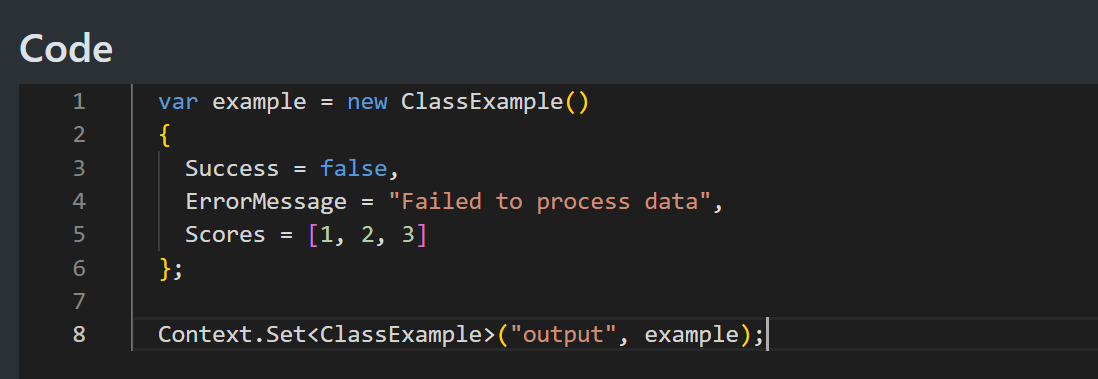
Now we can access the class and add it to a context inside the Code node.