Running Workflows
This section covers how to run workflows programmatically from your own code.
Get IEngineService
Workflow execution starts from IEngineService.
var engine = serviceProvider.GetRequiredService<IEngineService>();
If you prefer workflow names instead of stored identifiers, use GetWorkflowId.
Top-level workflows are resolved by name directly.
Foldered workflows are resolved with a single slash-qualified name such as Support/Chat.
var engine = serviceProvider.GetRequiredService<IEngineService>();
var workflowId = await engine.GetWorkflowId("Example Workflow");
var folderedWorkflowId = await engine.GetWorkflowId("Support/Chat");
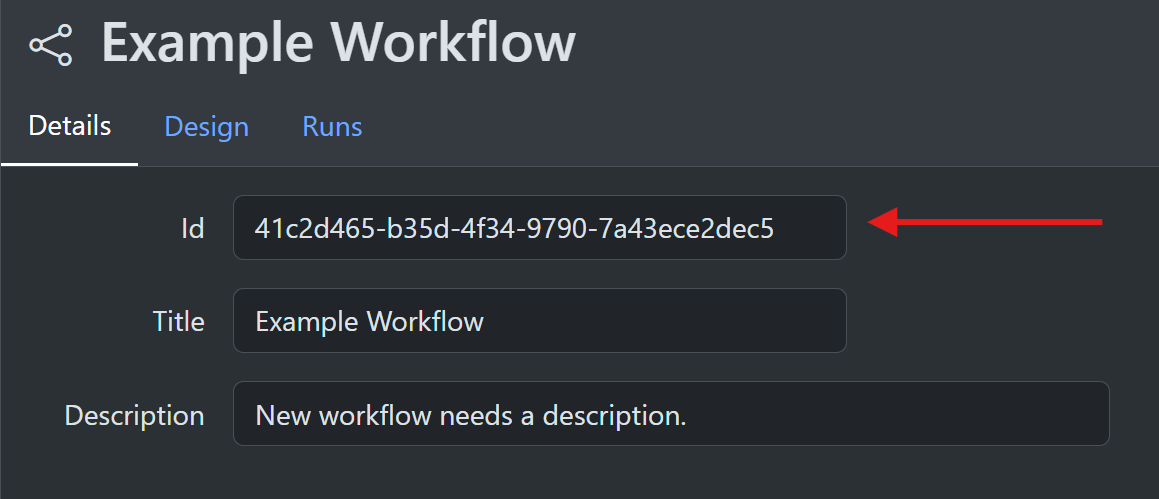
You can also get the workflow identifier directly from the editor UI.
Run A Standard Workflow
Standard workflows are one-shot runs started directly from the workflow identifier.
Await the result
Use StartWorkflowRunAndWait when you want the completed Run back in the current async flow.
var engine = serviceProvider.GetRequiredService<IEngineService>();
var workflowId = await engine.GetWorkflowId("Example Workflow");

var completed = await engine.StartWorkflowRunAndWait(workflowId);
if (completed.RunStatus == RunStatus.Failed)
{
    Console.WriteLine($"Failed with error {completed.Error}");
}
else if (completed.RunStatus == RunStatus.Success)
{
    var jsonConverters = serviceProvider.GetRequiredService<IJsonConverterService>();
    var context = ContextObject.Deserialize(completed.OutputContext, jsonConverters);
}
Start and return immediately
Use StartWorkflowRunAndNotify when you want to begin execution and return the runId immediately.
Completion then arrives through IEngineNotification.
var engine = serviceProvider.GetRequiredService<IEngineService>();
var workflowId = await engine.GetWorkflowId("Example Workflow");

var runId = await engine.StartWorkflowRunAndNotify(workflowId);
Synchronous execution
StartWorkflowRunSynchronously is available when you deliberately want blocking execution.
This is usually not recommended for web request paths.
var engine = serviceProvider.GetRequiredService<IEngineService>();
var workflowId = await engine.GetWorkflowId("Example Workflow");

var completed = engine.StartWorkflowRunSynchronously(workflowId);
Pass Initial State
All standard workflow start methods accept an optional ContextObject.
That object becomes the initial run context.
var engine = serviceProvider.GetRequiredService<IEngineService>();
var workflowId = await engine.GetWorkflowId("Tenant Summary");

var context = new ContextObject();
context.Set("input.tenantId", "tenant-42");
context.Set("input.userId", "user-9");
context.Set("input.prompt", "Summarize the latest support tickets.");

var completed = await engine.StartWorkflowRunAndWait(workflowId, context);
If you want to mirror the editor's typed start-input experience, you can also pass ContextEntryListEntity through the inputEntries parameter.
That is useful when you want SharpOMatic to perform the same type conversions used by the Start node input editor.
Run A Conversation Workflow
Conversation workflows use different methods because they carry state across turns.
Use:
StartOrResumeConversationAndWaitStartOrResumeConversationAndNotifyStartOrResumeConversationSynchronously
These methods require both workflowId and conversationId.
Start the first turn
If the conversation does not exist yet, SharpOMatic creates it and starts from the Start node.
var engine = serviceProvider.GetRequiredService<IEngineService>();
var workflowId = await engine.GetWorkflowId("Support Chat");
var conversationId = $"support-chat-{Guid.NewGuid():N}";

var firstTurn = await engine.StartOrResumeConversationAndWait(
    workflowId,
    conversationId);
Continue after a completed turn
If the latest turn completed successfully, calling the same method again starts a new turn from the Start node. The previous turn's output context becomes the base context for the next turn.
var nextTurn = await engine.StartOrResumeConversationAndWait(
    workflowId,
    conversationId);
Resume a suspended turn
If the latest turn suspended, SharpOMatic resumes from the waiting continuation point instead of the Start node.
The default resume input is ContinueResumeInput, so a plain call is enough when no extra resume data is needed.
var resumed = await engine.StartOrResumeConversationAndWait(
    workflowId,
    conversationId,
    new ContinueResumeInput());
If the suspend point expects extra data, use ContextMergeResumeInput and merge a ContextObject into the resume operation.
var resumeContext = new ContextObject();
resumeContext.Set("resume.answer", "final answer");
resumeContext.Set("resume.approved", true);

var resumed = await engine.StartOrResumeConversationAndWait(
    workflowId,
    conversationId,
    new ContextMergeResumeInput { Context = resumeContext });
Conversation notifications
The notify variant works the same way but returns immediately with the new runId.
var runId = await engine.StartOrResumeConversationAndNotify(
    workflowId,
    conversationId);
IEngineNotification
IEngineNotification is used for workflow and evaluation completion plus connection, client, and model-fallback overrides.
All methods have default no-op implementations, so your notification class only needs to override the hooks it uses.
For standard one-shot runs, conversationId is null.
For conversation turns, conversationId is populated and RunCompleted can arrive with RunStatus.Suspended when the turn stops at a Suspend node.
public class EngineNotification(IServiceProvider serviceProvider) : IEngineNotification
{
    public Task RunCompleted(
        Guid runId,
        Guid workflowId,
        string? conversationId,
        RunStatus runStatus,
        string? outputContext,
        string? error)
    {
        if (runStatus == RunStatus.Failed)
        {
            Console.WriteLine($"Failed with error {error ?? ""}");
        }
        else if (runStatus == RunStatus.Success)
        {
            var jsonConverters = serviceProvider.GetRequiredService<IJsonConverterService>();
            var context = ContextObject.Deserialize(outputContext, jsonConverters);
        }

        return Task.CompletedTask;
    }

    public Task EvalRunCompleted(
        Guid evalRunId,
        EvalRunStatus runStatus,
        string? error)
    {
        return Task.CompletedTask;
    }

    public void ConnectionOverride(
        Guid runId,
        Guid workflowId,
        string? conversationId,
        string connectorId,
        AuthenticationModeConfig authenticationModel,
        Dictionary<string, string?> parameters)
    {
        if (connectorId == "azure_openai" && authenticationModel.Id == "api_key")
        {
            parameters["endpoint"] = "myEndpoint";
            parameters["api_key"] = "mySecret";
        }
    }

    public (ResponsesClient client, string modelName)? OpenAIOverride(
        Model model,
        ModelConfig modelConfig,
        AuthenticationModeConfig authenticationModeConfig,
        Dictionary<string, string?> connectionFields)
    {
        if (authenticationModeConfig.Id != "api_key")
            return null;

        var client = serviceProvider.GetKeyedService<ResponsesClient>($"openai:{modelConfig.ConfigId}");
        if (client is null)
            return null;

        var modelName = modelConfig.IsCustom && model.ParameterValues.TryGetValue("model_name", out var customModelName)
            ? customModelName
            : modelConfig.DisplayName;

        return (client, modelName);
    }

    public (ResponsesClient client, string modelName)? AzureOpenAIOverride(
        Model model,
        ModelConfig modelConfig,
        AuthenticationModeConfig authenticationModeConfig,
        Dictionary<string, string?> connectionFields)
    {
        if (authenticationModeConfig.Id != "api_key")
            return null;

        var client = serviceProvider.GetKeyedService<ResponsesClient>($"azure:{modelConfig.ConfigId}");
        if (client is null || !model.ParameterValues.TryGetValue("deployment_name", out var deploymentName))
            return null;

        return (client, deploymentName);
    }

    public IChatClient? GoogleGenAIOverride(
        Model model,
        ModelConfig modelConfig,
        AuthenticationModeConfig authenticationModeConfig,
        Dictionary<string, string?> connectionFields)
    {
        if (authenticationModeConfig.Id != "gen_ai")
            return null;

        return serviceProvider.GetKeyedService<IChatClient>($"google:{modelConfig.ConfigId}");
    }

    public (AnthropicClient client, string modelName)? AnthropicOverride(
        Model model,
        ModelConfig modelConfig,
        AuthenticationModeConfig authenticationModeConfig,
        Dictionary<string, string?> connectionFields)
    {
        if (authenticationModeConfig.Id != "api_key")
            return null;

        var client = serviceProvider.GetKeyedService<AnthropicClient>($"anthropic:{modelConfig.ConfigId}");
        if (client is null)
            return null;

        var modelName = modelConfig.IsCustom && model.ParameterValues.TryGetValue("model_name", out var customModelName)
            ? customModelName
            : modelConfig.DisplayName;

        return (client, modelName);
    }

    public (AnthropicClient client, string modelName)? FoundryAnthropicOverride(
        Model model,
        ModelConfig modelConfig,
        AuthenticationModeConfig authenticationModeConfig,
        Dictionary<string, string?> connectionFields)
    {
        var client = serviceProvider.GetKeyedService<AnthropicClient>($"foundry_anthropic:{modelConfig.ConfigId}");
        if (client is null || !model.ParameterValues.TryGetValue("deployment_name", out var deploymentName))
            return null;

        return (client, deploymentName);
    }
}
ConnectionOverride can mutate connector authentication fields before the model caller creates a provider client.
For OpenAI model calls, OpenAIOverride provides a lower-level escape hatch: the first registered notification that returns a non-null (ResponsesClient client, string modelName) supplies the Responses client and model name for that call.
For Azure OpenAI model calls, AzureOpenAIOverride provides a lower-level escape hatch: the first registered notification that returns a non-null (ResponsesClient client, string modelName) supplies the Responses client and deployment/model name for that call.
For Google model calls, GoogleGenAIOverride provides a lower-level escape hatch: the first registered notification that returns a non-null IChatClient supplies the chat client for that call.
For direct Anthropic model calls, AnthropicOverride provides a lower-level escape hatch: the first registered notification that returns a non-null (AnthropicClient client, string modelName) supplies the Anthropic client and model name for that call.
For Azure AI Foundry hosted Anthropic model calls, FoundryAnthropicOverride provides a lower-level escape hatch: the first registered notification that returns a non-null (AnthropicClient client, string modelName) supplies the Anthropic Foundry client and deployment/model name for that call.
Return null from any lower-level override to use SharpOMatic's default client creation path.
Model fallback override
ModelFallbackOverride can override SharpOMatic's built-in decision after a safe failed model attempt and before the next configured model is called:
public ValueTask<bool?> ModelFallbackOverride(
    ModelFallbackDecisionContext context,
    CancellationToken cancellationToken = default)
{
    if (context.Failure.StatusCode == 401 &&
        context.NextModel.ConnectorId != context.FailedModel.ConnectorId)
    {
        return ValueTask.FromResult<bool?>(true);
    }

    return ValueTask.FromResult<bool?>(null);
}
Return values mean:
true: try the next modelfalse: stop and surface the current failurenull: make no decision
Registered notifications are checked in registration order and the first non-null result wins. If all return null, SharpOMatic uses its built-in recommendation. The context includes the failed and next model/connector identities, normalized failure category and status, original exception, attempt position, and built-in recommendation. Connector secrets are not included.
The override is called only while fallback remains safe. It cannot force another attempt after cancellation, provider response output, or tool invocation has started.
Provider callers can classify SDK-specific errors before SharpOMatic applies its standard HTTP/network translation. BaseModelCaller exposes a virtual method, while IModelCaller supplies a compatible default implementation:
public override ModelFallbackFailure? ModelFallbackFailureOverride(Exception exception)
{
    if (exception is ProviderOverloadedException)
    {
        return new ModelFallbackFailure(
            ModelFallbackFailureCategory.ProviderUnavailable,
            StatusCode: 529,
            RetryAfter: null,
            IsTransient: true);
    }

    return null;
}
Returning null uses the standard classifier. This method only translates the provider error; ModelFallbackOverride and the engine safety gates still decide whether another model is called.
IProgressService
If you need run-state updates while execution is in progress, implement IProgressService.
RunProgress is also raised for conversation turns, including the final persisted RunStatus.Suspended state when a turn pauses for resume.
For OpenAI, Azure OpenAI, Anthropic, Foundry Anthropic, and Google model calls, StreamEventProgress and InformationsProgress are also raised while the node is still running.
That means partial assistant text, visible reasoning, tool-call lifecycle events, tool-call results, and assistant/reasoning/tool-call trace entries can all be forwarded immediately.
If you want live model-call output, use IProgressService rather than polling the repository during the call.
The engine buffers these model-call stream events and persists them when the call completes successfully.
public class ProgressService : IProgressService
{
    public Task RunProgress(Run run)
    {
        Console.WriteLine($"Workflow {run.WorkflowId} is now {run.RunStatus}");
        return Task.CompletedTask;
    }

    public Task TraceProgress(Run run, Trace trace)
    {
        Console.WriteLine(
            $"Workflow {trace.WorkflowId} Node {trace.NodeEntityId} is now {trace.Message}");
        return Task.CompletedTask;
    }

    public Task InformationsProgress(Run run, List<Information> informations)
    {
        Console.WriteLine($"Workflow {run.WorkflowId} published {informations.Count} information updates");
        return Task.CompletedTask;
    }

    public Task StreamEventProgress(Run run, List<StreamEventProgressItem> events)
    {
        Console.WriteLine($"Workflow {run.WorkflowId} published {events.Count} stream events");
        foreach (var item in events)
            Console.WriteLine($"  {item.Event.EventKind} silent={item.Silent}");
        return Task.CompletedTask;
    }

    public Task EvalRunProgress(EvalRun evalRun)
    {
        Console.WriteLine($"Eval run {evalRun.EvalRunId} is now {evalRun.Status}");
        return Task.CompletedTask;
    }
}
If you are hosting the embedded editor, live browser updates are normally only sent for runs created with needsEditorEvents: true.
For model calls, StreamEventProgress can now include:
- assistant text start, content, and end events
- visible reasoning lifecycle events
- tool-call start, args, end, and result events
For code-node stream helpers, StreamEventProgress also carries a transient Silent flag.
That flag is only for live progress consumers such as AG-UI SSE translation and is not stored in the persisted StreamEvent rows.
Code nodes can emit text, step, reasoning, tool-call, activity, state, and custom lifecycles through the Events.Add* helper methods.
InformationsProgress can include the corresponding assistant, reasoning, and tool-call trace entries that appear in the trace viewer.
Notes
- Use standard workflow methods for one-shot workflows.
- Use conversation methods only for conversation-enabled workflows.
- Conversation-enabled workflows cannot be started through the standard workflow methods.
- Suspended conversations cannot accept start input entries during resume.
conversationIdis a string and can be any identifier your application controls.
For more detail on state handling, see Managing State. For protocol-based conversation clients, see AG-UI.